Super Webhooks for Chrome
I was looking for a way to send details of web pages, or page context, to my automation tools like n8n, Zapier, or IFTTT. Doing this manually is a friction-filled process of copying, switching tabs, and pasting. Ideally, I could use this for simple bug tracking. By using the context of the page and browser, I can easily send additional metadata that can be captured and used by clients for logging bugs.
So I built Super Webhooks, a modern Chrome extension designed to make workflow automation as simple as a right-click.
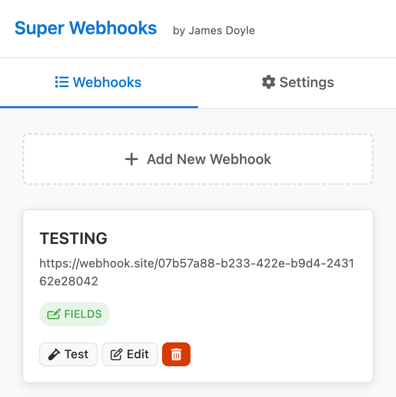
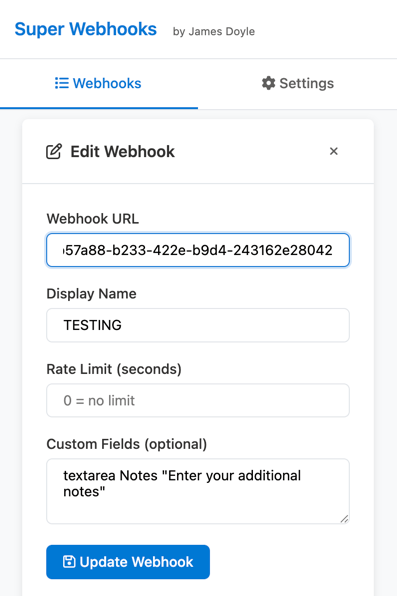
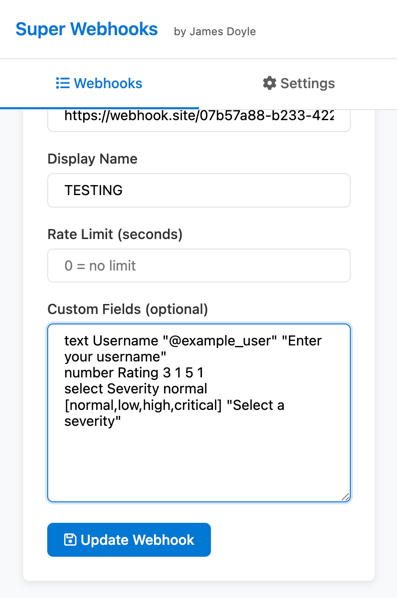
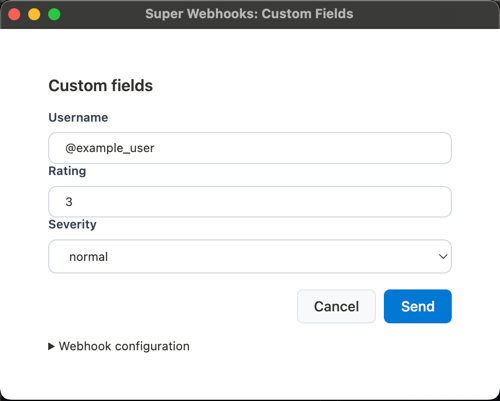
Key Features at a Glance
- Intelligent Queueing & Rate Limiting: Avoid API abuse or server crashes by setting per-webhook rate limits. The extension intelligently queues your requests and shows a real-time countdown of when your data will be sent.
- Rich Data Payloads: It sends more than just a URL. Every request includes page metadata (title, description, keywords), timestamps, and device details like OS and browser version.
- Custom Fields DSL: One of the most powerful features is the built-in Domain-Specific Language (DSL) for custom forms. You can define dynamic fields (text, dropdowns, checkboxes) that appear before a webhook is sent, allowing you to add extra context—like notes or categories—on the fly.
How Is It Different?
Super Webhooks allows you to register multiple webhook endpoints and send rich data to them instantly via the context menu. The main way to see a context window is to right-click things on the page. There are custom handlers for each content type. So if you right-click on an image, you get different details than right-clicking on a video.
The biggest thing that makes it different is the support for custom fields.
The custom fields support in the extension allows users to dynamically attach additional, user-provided data to a webhook payload before it is sent.
Use Cases
- Dynamic Form Generation: The extension uses a lightweight Domain-Specific Language (DSL) to convert simple text commands into structured web forms.
- Per-Webhook Configuration: Custom fields are configured individually for each webhook, providing flexibility for different automation needs.
- Modal Input: When a webhook with configured custom fields is triggered, a dedicated modal window opens for the user to fill in the data before the request is finalized.
- Direct Payload Integration: The information gathered from these fields is included in the final JSON payload sent to the webhook endpoint under a
customFieldsobject.
Supported Field Types
The DSL parser supports a variety of standard HTML input types, including:
- Text & Textarea: For single-line or multi-line text input.
- Selection: Dropdown menus for choosing from predefined options.
- Boolean & Options: Checkboxes and radio button groups.
- Numeric: Standard number inputs and range sliders.
- Specialized: Support for
password,email,date,color,url, andhiddenfield types.
DSL Syntax Overview
Fields are defined using a human-readable syntax: [input_type][*] [FieldName] [arguments...] "Label or Placeholder".
- Adding an asterisk (e.g.,
text*) marks a field as required. - Arguments allow for setting default values, numeric ranges (min/max/step), or lists of options for select menus.
- The system ignores lines starting with
#, allowing for comments within the configuration.
How I Use It
The most basic use case for me is sending the page URL to my n8n instance and storing it in my Pockethost database. I have a custom field on that action for "notes" in case I have something to add. My n8n flow will crawl the URL and create a summary of the page content.
Installation
It is not on the Chrome Webstore yet, so you need to install it manually right now. The instructions are on the GitHub page: james2doyle/super-webhooks-extension

James Doyle
I'm a full-stack developer, co-organizer of PHP Vancouver meetup, and winner of a Canadian Developer 30 under 30 award. I'm a huge Open Source advocate and contributor to a lot of projects in my community. When I am not sitting at a computer, I'm trying to perfect some other skill.